
Why Modern Pinball Machines Keep Getting Code Updates
TLDR: Why modern pinball machines keep getting code updates comes down to how much of the experience is software-driven. Code can govern rules, scoring, modes, audiovisual presentation, adjustments, diagnostics and supported online features. Manufacturers therefore keep revising software after cabinets ship, whether to expand gameplay, correct faults, rebalance scoring or maintain the underlying system. Owners should judge each update by its release notes, not its version number alone.
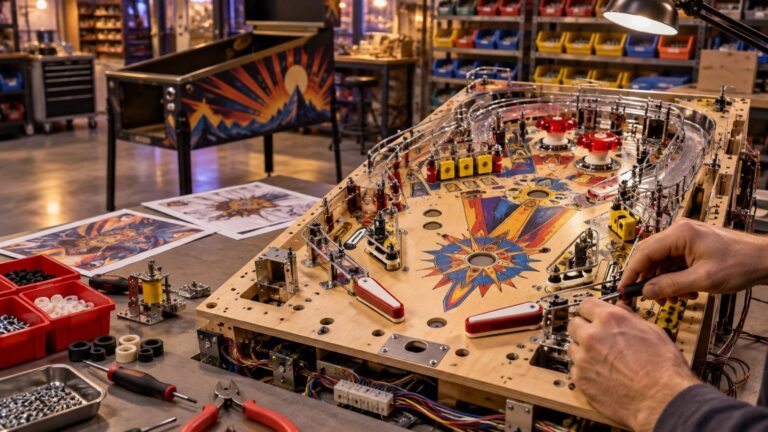
A modern machine is physical hardware controlled by a software brain. The ball still hits real switches, coils still fire and mechanical assemblies still wear, but the machine needs code to interpret those events and decide what happens next. Shipping the cabinet consequently does not end software development in the way it largely did for older solid-state games with simpler rule sets.
What pinball “code” actually controls
Game code is more than a list of scoring values. Depending on the machine, it can determine when a mode starts, which shots advance it, how jackpots are calculated, what appears on the display and which lights or sounds accompany an event. It can also handle operator adjustments, diagnostic information and interactions with supported connected services.
That does not mean every cabinet feature is fixed through software. A loose connector, weak coil, misaligned switch or troublesome mechanical assembly remains a hardware issue. Code can sometimes improve how a device is driven or how an error is detected, but it cannot tighten a screw. Understanding that boundary helps owners avoid treating every odd behavior as either exclusively a software fault or exclusively a mechanical one.
The overlap between software and physical engineering is also why modern development continues well beyond the initial concept stage. Our overview of how modern pinball machines are designed and manufactured explains how software, mechanisms, artwork and assembly converge in the finished game.
Why modern pinball machines keep getting code updates
Most updates fall into four broad categories: gameplay development, scoring and difficulty changes, bug fixes, and platform maintenance. One package can contain work from several categories, so “new code” does not automatically mean either a major rules expansion or a minor repair.
Rules, modes and presentation can be expanded
An update may add or revise modes, progression paths, wizard objectives, display sequences, callouts or light shows. These are the most visible changes because they can make familiar shots serve new purposes or provide a clearer sense of progress through the game.
This is also the category most likely to fuel arguments about whether a game shipped “unfinished.” Sometimes an update plainly adds substantial gameplay. Other releases may refine rules that were already functional. The responsible way to distinguish those situations is to read the notes for that title rather than infer the answer from update frequency or a single version label.
Scoring and difficulty need balancing
Complex rules create interactions that may not reveal their full consequences before thousands of public games have been played. A scoring opportunity can prove too dominant, an objective may be harder than intended, or one strategy may overwhelm the rest of the rules. Developers can change values, timers, qualifications or award logic to encourage a healthier variety of shots and strategies.
Balance changes are not guaranteed improvements for every player. A competitive player may welcome tighter scoring while a family owner may prefer an earlier, more generous setup. Check whether the machine provides operator adjustments that preserve the experience you want before assuming an update forces everyone into the same difficulty.
Bugs can exist in rules and system behavior
Modern rules have many possible states: multiple objectives can run together, multiballs can overlap and physical switch events can arrive in unexpected sequences. Updates can correct scoring errors, stuck states, presentation problems or other behaviors that emerge under particular combinations of events.
Some work goes deeper than game rules. The official Stern SPIKE system manual treats game-software installation as a service procedure and separately documents complete SD-card and operating-system image procedures. That distinction shows why “code update” can describe both an ordinary game package and more fundamental system maintenance.
Connected services evolve too
Where a machine supports connected features, updates may also maintain or extend those functions. Stern has described Insider Connected features including player profiles, achievements, promotions, location tools, remote adjustments, maintenance tools and automatic machine-code downloads. Availability depends on the title, hardware and service configuration; it should not be assumed for every machine.
This adds another software layer to ownership. The cabinet can remain playable as a physical game while a profile, achievement or operator-facing service receives separate attention. Release notes should make clear whether an update changes core rules, connected functions or both.
A low version number does not settle the “unfinished” debate
Version labels are useful identifiers, but they are poor buying verdicts. A release numbered below 1.0 is not automatically unplayable or incomplete, and version 1.0 does not promise that development has ended. Manufacturers do not all use the same numbering conventions.
Instead, ask three practical questions: What can the current software do? What does the proposed update change? Is the machine enjoyable and dependable on the installed release? Those answers matter more than whether the service menu shows 0.95, 1.0 or another label.
For a prospective buyer, release notes can reveal the direction of support. Regular, clearly documented fixes and additions are useful signals that development is active, but they do not guarantee future updates, better resale value or long-term reliability. Buy the machine for the game it is today, with later improvements treated as a benefit rather than a promise.
Should owners install every update immediately?
Usually, no rush is required unless the manufacturer identifies an urgent fault, compatibility requirement or service issue. A home owner can first read the notes and decide whether the changes matter. An operator may prioritize a fix affecting reliability or connected management, while a home player may wait if an update substantially changes scoring shortly before a tournament or family event.
The installation method matters as much as the contents. Jersey Jack Pinball’s Toy Story 4 support documentation distinguishes a delta update from a full installation. It explains that a full install may be necessary when underlying operating-system changes are involved and warns that the full-install process can reset settings and high scores. That consequence belongs to this documented procedure and should not be generalized to every update or manufacturer.
In other words, never assume that all USB files or update options are interchangeable. Match the package to the exact title and edition, follow the applicable instructions and take any recommended backup steps. If preserving scores is important, verify what the procedure retains before starting.
A practical pinball update checklist
Before changing a working machine, I would use this sequence:
- Identify the exact game, edition and currently installed software version in the service menu.
- Find the manufacturer’s support page and release notes for that exact title. Do not use instructions from a similar machine merely because it shares a hardware platform.
- Separate the changes into gameplay additions, scoring adjustments, bug fixes, connected features and system maintenance.
- Check whether the package is a routine update, delta package, full installation or operating-system image. Those terms are not interchangeable.
- Record important adjustments and follow any manufacturer guidance for backing up settings or high scores.
- Use the specified installation method and storage format. Avoid interrupting power while the update is being written.
- After installation, confirm the reported version and test the flippers, trough, switches, major assemblies, display and sound.
- If you use connected features, verify the network connection, player login and any operator functions that matter to your setup.
When evaluating a used game, include the installed version in the broader inspection rather than making it the sole deciding factor. Mechanical condition, display health, playfield wear, replacement-part availability and repeat-play appeal still matter. The wider first pinball machine buying checklist covers those ownership variables.
How physical updates differ from virtual pinball patches
Virtual pinball platforms also receive packages that combine content, interface changes and fixes. Zen Studios’ August 29, 2024 Pinball FX notes, for example, listed content additions alongside interface, performance, sound, physics-related and table-specific changes.
The ownership consequences are different. A virtual patch operates within a computer or console environment. A physical-machine update must interact with the cabinet’s actual switches, lamps, coils and mechanisms, while the owner may also need to preserve machine-specific adjustments and scores. Physical code cannot eliminate mechanical maintenance, and virtual software does not have to account for wear on an individual ball trough or diverter.
The common lesson is still useful: read the notes. In both formats, a patch number tells you less than the documented list of additions, fixes and known limitations.
Judge the change, not just the number
Ongoing code development is a normal consequence of building a deep physical game around software-controlled rules and services. It can produce richer modes, clearer presentation, better balance and important corrections, but an active update schedule is neither proof of poor initial quality nor a guarantee of future greatness.
For owners, the next step is simple: note the machine’s installed version, locate the matching official release notes and decide whether the documented changes improve your actual use of the game. For buyers, judge the machine on how enjoyable and supportable it is now. Version numbers identify releases; they do not make the buying decision for you.